Key Takeaways
- •Thought leader ads sponsor existing organic posts from employee profiles, showing up as personal content (not corporate ads) in LinkedIn feeds — achieving 2x higher CTR than standard sponsored content.
- •Setup requires explicit employee consent through Campaign Manager's sponsorship request process, plus careful targeting of 5,000-50,000 prospects using matched audience lists layered with job function filters.
- •Strategic post selection matters: choose content that already has organic engagement and fits your narrative sequence rather than overtly promotional posts.
- •The real power comes from sequencing TLAs into Story Arcs — 5-7 posts delivered in narrative order over weeks to build recognition, not just awareness.
What Are Thought Leader Ads (And Why They Work)
TL;DR: Thought leader ads let you sponsor an employee's organic LinkedIn post as a paid ad, combining personal credibility with paid targeting precision.
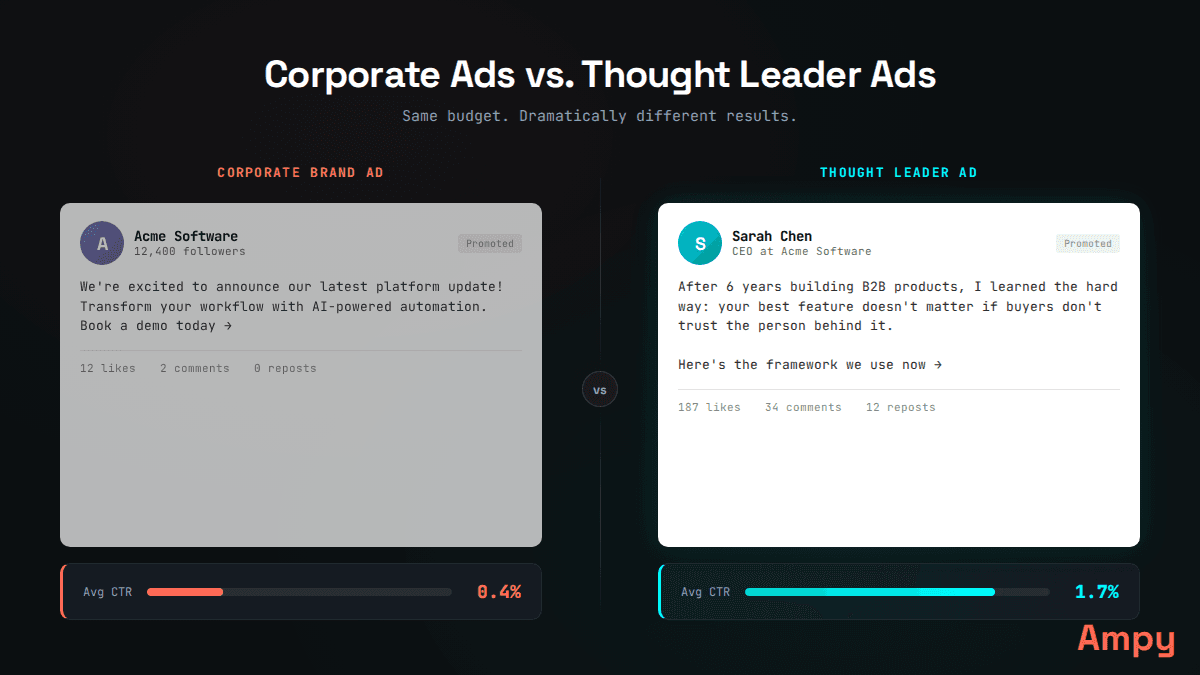
Thought leader ads appear as personal posts in the feed, not corporate ads. That changes everything about engagement rates.
LinkedIn thought leader ads (TLAs) take an existing organic post from an employee's personal profile and put paid distribution behind it. The post shows up in the feed as that person's content — not as a corporate ad unit. The reader sees a face, a name, a real person.
Why does that matter? Because LinkedIn users scroll past branded content. They stop for people. LinkedIn's own data shows thought leader ads generate 2x higher click-through rates compared to standard single image ads (LinkedIn Business, 2024).
Karl has run campaigns across companies like Stripe, Carta, and Step where ad budgets exceeded $30M. His take on TLAs is direct: "Thought leader ads offer you a chance to be in front of your target accounts in a way they like consuming content on LinkedIn today. You can get your message in front of that user, coming from a real person." That real person could be a CEO, a VP of Engineering, a product lead — whoever the prospect would actually want to hear from.
The broken operating model in B2B advertising treats every ad as a corporate broadcast. TLAs break that model by borrowing the trust of an individual. For ABM teams running account-based marketing on LinkedIn, this is the format that closes the gap between "saw your ad" and "recognized your name."
Prerequisites Before You Start
TL;DR: You need Campaign Manager admin access, at least one employee willing to be sponsored, and organic posts already published on their personal LinkedIn profile.
Before touching Campaign Manager, get these in order:
1. Campaign Manager access. You need to be an Account Manager or Campaign Manager admin on your company's LinkedIn ad account. Content Manager won't cut it.
2. Employee buy-in. The person whose posts you're sponsoring must approve the sponsorship request. LinkedIn requires explicit consent — you cannot sponsor someone's post without their permission (LinkedIn Help, 2024).
3. Published organic posts. TLAs sponsor existing organic posts. The employee needs live posts on their personal profile. You cannot create new posts through Campaign Manager for TLAs.
4. Company page connection. The employee must be listed as an employee of the company on their LinkedIn profile. Their current position must match the sponsoring company page.
5. Budget allocation. TLAs use the same bidding and budgeting system as other LinkedIn ad formats. Plan for a minimum daily budget of $10-50 per campaign depending on audience size.
One note: not every post format is eligible. LinkedIn currently supports single-image posts, video posts, text-only posts, and document posts for thought leader ads. Polls, articles, and shared posts are not eligible (LinkedIn Ads Guide, 2025).
Step 1: Request Employee Sponsorship Permission
TL;DR: In Campaign Manager, navigate to your ad account, go to "Thought Leader Ads" under Account Assets, and send a sponsorship request to the employee. They must accept it before you can use their posts.
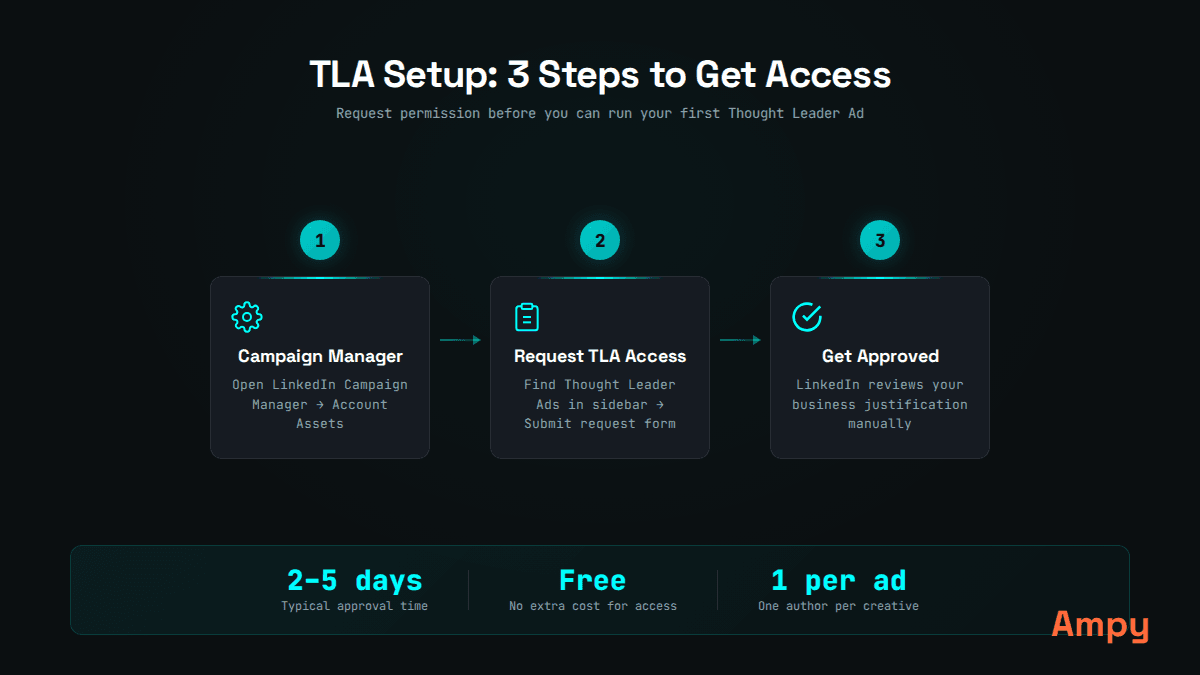
The sponsorship request flow lives under Account Assets in Campaign Manager.
Here is the exact path:
- Log into Campaign Manager.
- Select the ad account associated with your company page.
- In the left navigation, click Account Assets.
- Click Thought Leader Ads.
- Click Request Permission and search for the employee by name.
- Select the employee and send the request.
The employee will receive a notification on LinkedIn. They must accept the request. Once accepted, their posts become available for sponsorship within that ad account. This permission stays active until the employee revokes it or leaves the company.
A common sticking point: if the employee doesn't see the notification, have them check Settings & Privacy → Account Preferences → Thought Leader Ads on their LinkedIn profile. The request shows up there even if the notification gets buried.
Step 2: Create Your Campaign in Campaign Manager
TL;DR: Create a new campaign group and campaign, select your objective (Brand Awareness or Engagement work best for TLAs), and choose Single Image Ad or Video Ad as the format.
Walk through these steps:
- In Campaign Manager, click Create → Campaign.
- Select or create a Campaign Group. Name it clearly — something like "TLA - [Employee Name] - Q1 2026."
- Choose your objective. For thought leader ads, Brand Awareness and Engagement are the strongest fits. Brand Awareness optimizes for impressions. Engagement optimizes for clicks, reactions, and comments. If you're running TLAs for ABM, Brand Awareness with frequency caps often outperforms Engagement (LinkedIn Marketing Solutions Blog, 2024).
- Under Ad Format, select Single Image Ad (or Video Ad if the post contains video).
Do not select "Thought Leader Ad" as a format — that is not how it works. You select a standard format and then, at the ad creation step, you choose to sponsor an existing employee post instead of creating a new ad.
Step 3: Configure Targeting for ABM
TL;DR: Upload a matched audience list of target accounts, layer on job function and seniority filters, and keep your audience between 5,000 and 50,000 for optimal delivery.
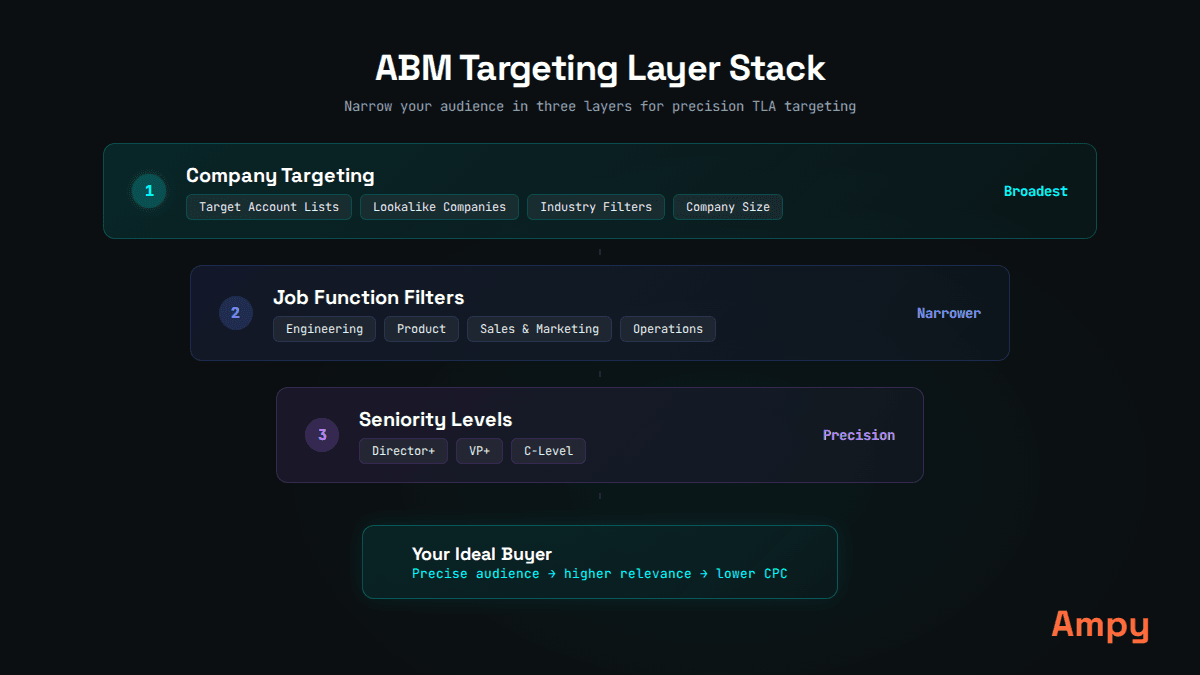
Layer matched audiences with job attributes for precise account-based targeting.
Targeting is where TLAs become a real ABM weapon. Here is how to configure it:
1. Start with a Matched Audience. Upload your target account list (company names or domains) under Account Assets → Matched Audiences in Campaign Manager. LinkedIn typically matches 60-80% of uploaded companies (LinkedIn Marketing Solutions, 2024).
2. Layer job attributes. Add Job Function (e.g., Marketing, Sales, IT) and Seniority (e.g., Director, VP, CXO) as additional targeting filters. This narrows the audience to the actual decision-makers at your target accounts.
3. Exclude current customers. Upload a suppression list of existing customer accounts to avoid wasting spend.
4. Check your audience size. LinkedIn shows a forecasted audience size in the right panel. For ABM-focused TLA campaigns, aim for 5,000 to 50,000. Below 5,000, delivery gets inconsistent. Above 50,000, you lose the precision that makes TLAs valuable.
5. Enable LinkedIn Audience Network: No. Turn this off. Audience Network extends delivery to third-party sites, which defeats the purpose of showing up in the LinkedIn feed as a personal post.
Karl's perspective from running ABM at scale: "The power of thought leader ads is being in front of those people in an ad format that gives you the highest likelihood of chance for them to engage with you." Targeting precision makes that possible. A VP of Sales at a target account sees a post from your CEO in their feed. It looks organic. It feels personal. That is the setup TLAs are designed for.
Step 4: Select the Organic Post to Sponsor
TL;DR: At the ad creation step, choose "Browse existing content," select the employee's post you want to sponsor, and preview how it will appear as an ad.
This is where the TLA setup diverges from standard ad creation:
- In the ad creation step, click Browse existing content.
- You will see a toggle or filter for Thought Leader Ads or Employee Posts. Select it.
- Browse the employee's recent organic posts. Only eligible post formats will appear.
- Select the post you want to sponsor.
- Preview the ad. The post will show the employee's name and profile photo, with a small "Promoted" label beneath.
Which posts should you sponsor? Choose posts that already have some organic engagement. A post with 50+ reactions and meaningful comments signals that the content resonates. You are adding fuel to something already working.
Avoid sponsoring posts that are overtly promotional. The entire value of TLAs is that they feel organic. A post that reads like ad copy defeats the purpose.
For teams running sequenced LinkedIn ads, post selection becomes strategic. You're not just picking "the best post." You're selecting posts that fit a narrative sequence — a Story Arc that moves the prospect from problem awareness to solution recognition over multiple exposures.
Step 5: Set Budget and Bidding
TL;DR: Start with $50-100/day for testing, use maximum delivery bidding initially, and plan for CPCs between $2-6 depending on audience size and targeting precision.
Budget and bidding settings for TLAs:
1. Daily budget: Start with $50-100/day per campaign for a meaningful test. Below $50/day, LinkedIn's algorithm doesn't have enough budget to optimize delivery.
2. Bidding strategy: Use Maximum Delivery (automated bidding) for the first 7-14 days. This lets LinkedIn's algorithm find the most efficient delivery. After collecting data, you can switch to manual CPC bidding if needed.
3. Schedule: Set a start and end date. For ABM campaigns, run each TLA for 2-3 weeks before rotating to the next post in your sequence.
4. Expected costs: TLAs typically deliver lower CPCs than standard sponsored content because the ad format generates higher engagement. Industry benchmarks show TLA CPCs ranging from $2-6, compared to $8-12 for standard single image ads (Metadata.io B2B Paid Social Benchmark Report, 2024).
5. Frequency cap: If your objective is Brand Awareness, LinkedIn lets you set a frequency cap. For ABM, a frequency of 7-10 impressions per person over 30 days tends to build recognition without causing fatigue (LinkedIn Marketing Solutions Blog, 2024).
Step 6: Launch and Monitor
TL;DR: Launch the campaign, monitor engagement rate and CTR daily for the first week, and watch for the engagement pattern that signals organic amplification.
After launching:
1. Check delivery. In the first 24-48 hours, confirm the campaign is spending and delivering impressions. If delivery is low, your audience may be too narrow or your bid too low.
2. Monitor engagement rate. TLAs should deliver engagement rates of 1.5-3%, well above the LinkedIn sponsored content average of 0.44% (Hootsuite Social Media Benchmarks, 2024). If engagement is below 1%, the post selection needs revisiting.
3. Watch for organic amplification. When a TLA gets engagement (likes, comments), LinkedIn's organic algorithm can amplify the post beyond your paid audience. This is the compounding effect — paid distribution triggers organic distribution. Track total impressions vs. paid impressions to measure this.
4. Track downstream metrics. Beyond engagement, watch for profile views on the sponsored employee's profile, company page followers, and website visits. These are the leading indicators that recognition is building.
The Multiplier: Sequencing Thought Leader Ads with Story Arcs
TL;DR: A single TLA builds awareness. A sequence of TLAs, delivered in narrative order through Ampy's Story Arc methodology, builds the recognition that drives pipeline.
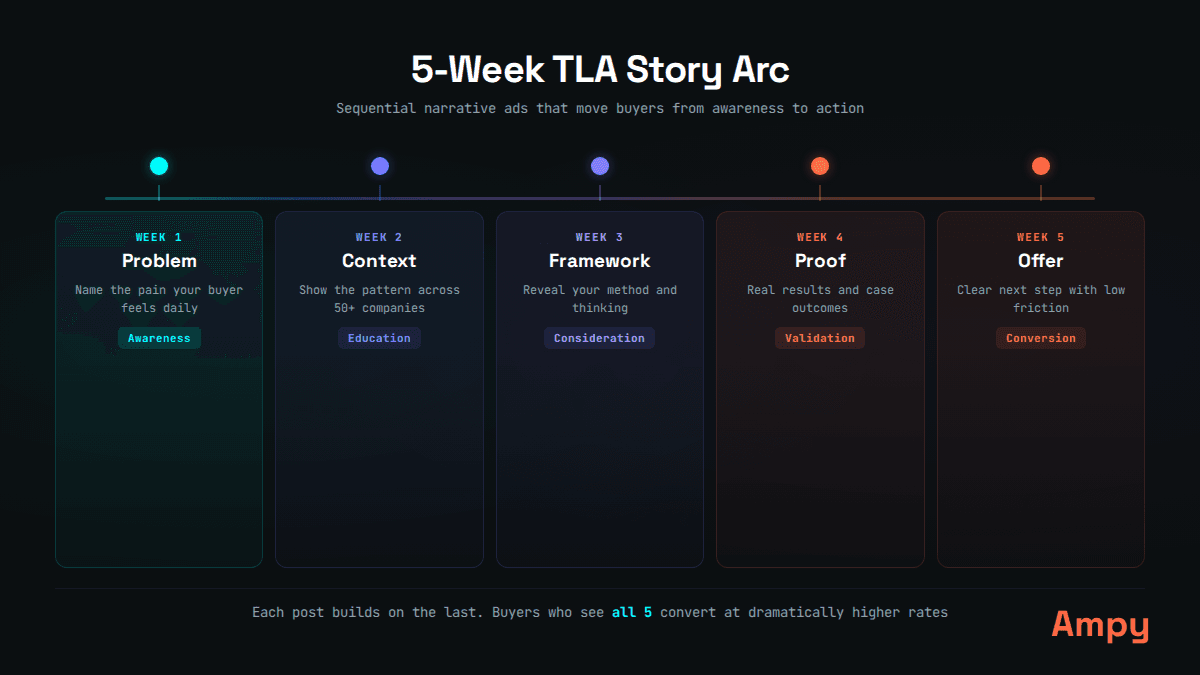
Story Arcs sequence thought leader ads into a narrative that builds recognition over time.
Here is where most TLA strategies stop short. They sponsor one post, see good engagement, and call it a win. But Karl sees it differently: "The multiplier effect here is thought leader ads and repeated exposure. That's the next level. Another level is you're telling a story with that repeated exposure."
Single-exposure advertising has a recognition problem. A prospect sees one post, maybe engages, then forgets. Research from the Ehrenberg-Bass Institute (2021) shows that B2B buyers need 6-8 brand touchpoints before they move from awareness to consideration. One TLA isn't enough.
Ampy's Story Arc methodology solves this by sequencing thought leader ads into a narrative. Instead of random, disconnected posts promoted at random intervals, Story Arcs deliver a planned sequence:
- Week 1-2: Problem post. Name the pain the target audience feels.
- Week 2-3: Evidence post. Show data that validates the problem.
- Week 3-4: Framework post. Introduce a mental model for solving it.
- Week 4-5: Proof post. Share results from someone who applied the framework.
- Week 5-6: Path forward post. Connect the dots to what comes next.
Each post builds on the previous one. The prospect doesn't just see your name once — they experience a narrative arc that moves them from "interesting" to "I need to talk to these people."
This is the Frequency Squeeze in action. You're concentrating impressions on a defined audience over a specific time window, rather than spreading them thin across months. The result is faster recognition and higher recall when the buying moment arrives.
For teams ready to run sequenced TLA campaigns at scale, Ampy serves as mission control for B2B content distribution — automating the sequencing, targeting, and rotation that would otherwise require a full-time ads operator.
Common Mistakes to Avoid
TL;DR: The biggest TLA mistakes are sponsoring salesy posts, ignoring frequency, targeting too broadly, and treating TLAs as one-off tactics instead of sustained campaigns.
1. Sponsoring promotional posts. If the organic post reads like an ad, it will perform like an ad. TLAs work because they feel authentic. Sponsor posts that teach, share data, or tell stories — not product announcements.
2. No frequency strategy. Running one TLA for a week and stopping teaches your audience nothing. Recognition requires repeated exposure over weeks.
3. Targeting too broadly. A TLA shown to 500,000 random LinkedIn users is just an expensive awareness play. TLAs are precision instruments. Use them on defined account lists with role-based targeting.
4. Ignoring post selection criteria. Not every post deserves paid distribution. Sponsor posts that already demonstrate organic traction and that fit your narrative sequence.
5. Skipping the employee approval step. This sounds obvious, but teams regularly build full campaigns only to realize they never requested sponsorship permission. Get permissions in place before campaign planning.
Frequently Asked Questions
How much do LinkedIn thought leader ads cost?
TLA CPCs typically range from $2-6, compared to $8-12 for standard sponsored content. The lower cost comes from higher engagement rates — LinkedIn's algorithm rewards content that gets interactions. Plan for a minimum daily budget of $50 for meaningful data collection.
Can you sponsor any employee's LinkedIn post as a thought leader ad?
No. The employee must be listed as working at your company on their LinkedIn profile, and they must explicitly approve a sponsorship request through Campaign Manager. Only certain post formats are eligible: single-image, video, text-only, and document posts. Polls, articles, and shared posts cannot be sponsored.
What is the difference between thought leader ads and regular LinkedIn sponsored content?
Standard sponsored content comes from your company page and shows your company logo. Thought leader ads promote a post from an individual employee's profile, showing their personal photo and name. The 'Promoted' label is smaller and less prominent. This personal format drives engagement rates 2-3x higher than corporate-branded ads because users trust and engage with people more than logos.
How many thought leader ads should you run at once?
For ABM campaigns, run 1-2 TLAs simultaneously per audience segment. Rotate posts every 2-3 weeks to keep the content fresh. If you are running a Story Arc sequence, you will have one active TLA at a time per sequence, with the next post in the arc launching as the previous one winds down.
Do thought leader ads work for small companies without executives with large followings?
Yes. The employee being sponsored does not need a large organic following. The paid distribution handles reach. What matters is that the person is credible and relevant to the target audience. A solutions engineer with 400 connections can outperform a CEO with 10,000 followers if the target audience cares more about technical credibility than executive authority.
Ready to set up sequenced thought leader ads that build recognition?
Karl partners directly with B2B teams to implement Story Arc sequences with thought leader ads — turning executive content into recognition-building campaigns.
Get early access to Mission Control
One email. We'll reach out when your seat is ready.
One email. No spam. Just early access.
Related Articles
Thought Leader Ads — The Complete LinkedIn Guide (2026)
The definitive guide to thought leader ads (TLAs) on LinkedIn. Learn setup, costs, best practices, and why sequenced TLAs outperform one-off campaigns.
Story Arc Methodology: The 7-Episode Framework for Sequenced LinkedIn Ads
A Story Arc is 5-7 posts delivered in sequence to the same target accounts. Learn the framework for turning exec content into recognition-building campaigns.
LinkedIn Ad Formats for ABM: Complete Comparison Guide 2026
Compare all LinkedIn ad formats for account-based marketing. Learn which formats work best for different ABM objectives and target account sizes.
Karl Newlin
Founder & CEO, Ampy
Karl has run over $30M in LinkedIn ad budgets across companies like Stripe, Carta, and Step. His experience setting up thought leader ads at scale — from single campaigns to sequenced Story Arcs — shows exactly which settings matter and which are just noise in Campaign Manager.